
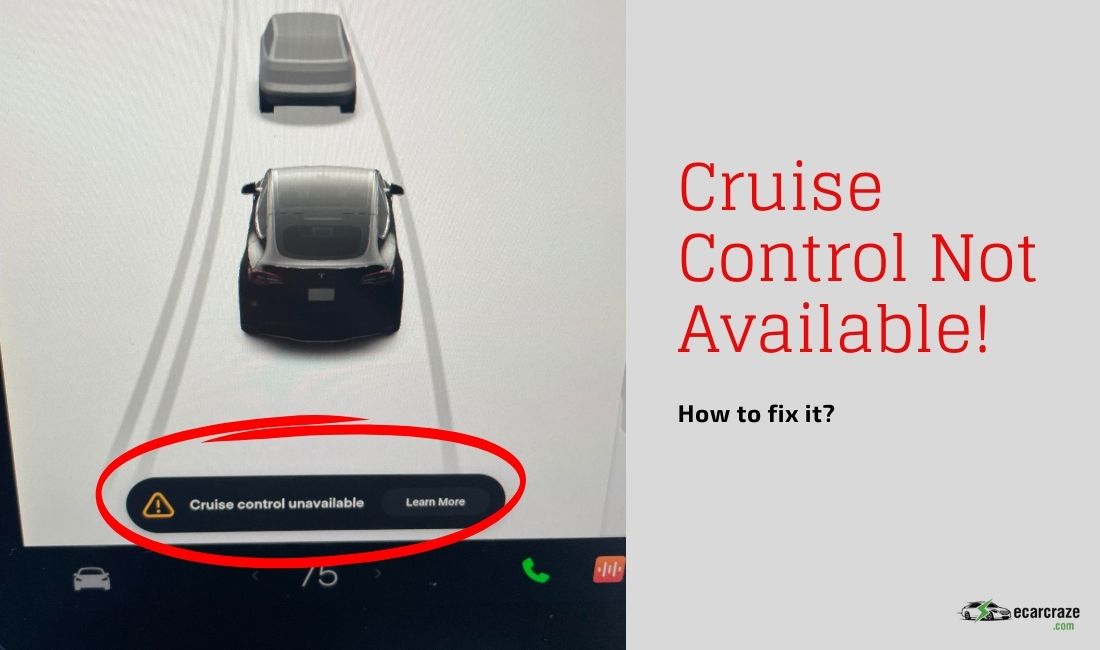
Cruise control is among the features most Tesla drivers use for a comfortable driving experience. However, on some occasions, this feature becomes inactive, displaying a cruise control not available error.
But what causes Tesla’s “cruise control unavailable” error? Issues with the sensors, cameras, and radars used in cruise control cause this issue. However, safety restrictions and limitations, like sharp curves or foggy or rainy weather, can also cause issues. Schedule a check or visit the nearest Tesla service station.
Want to learn more? Read on for an in-depth cover of these possible causes with Tesla cruise control and the solutions.
Why Does “Cruise Control Unavailable” Error Message Show On My Tesla?
The error pops up on the touchscreen when you try to enable cruise control, notifying you that it’s unavailable. However, the error message and others, including the “driving visualization temporarily degraded,” can be found under the notification menu.
The following are the various reasons this error can occur in your Tesla and the solutions.
1. Component Issues
One of the possible reasons this error shows on your Tesla is due to component issues. The driver-assistance system involves various sensors, cameras, and radar. When either of these components is faulty, the cruise control feature can show this error.
Usually, these parts fail due to damage, dirt, or obstructions, which can result in calibration issues.
Diagnosis
To confirm this as the cause of the error and issue with the cruise control, check these parts for dirt and damage. There are around 8 cameras in Tesla, and using the Owner’s Manual, you’ll be able to locate them.
Solutions
- Clean the cameras and sensor location to clear any dust or debris obstructing the view.
- Replacing these components is best handled by Tesla professionals to avoid damage to other parts.
- Take the vehicle to a Tesla service station nearby or schedule an appointment to get your car diagnosed and fixed.
2. Safety Restriction
The Tesla’s cruise control may also have this error due to safety restrictions and limitations. These safety restrictions and limitations help prevent accidents when using cruise control in various situations, such as roads with sharp curves, poor visibility, and bright light obstructions.
When attempting to activate the cruise control on this occasion, you may get the cruise control not available error message.
Solutions
The solution is to drive manually until there are no sharp curves, poor visibility, usually due to fog or rain, and light obstructions. If all these conditions are satisfied, but the error persists, consider taking the vehicle to a Tesla service station for a check-up.
3. Update Issues
During the update, various features get disabled temporarily until the process is through.
Occasionally, these features fail to come back on after an update, which can be what caused the error on the cruise control on your vehicle.
Solutions
If the cruise control errors start after an update, various things can help fix it. They include the following.
# Open and Close Doors, Frunk, and Trunk
This solution is among the most successful ones in clearing this issue with cruise control and most Tesla professionals suggest when you have this issue.
Unlock all the doors, the frunk, and the trunk of your Tesla, and then lock them.
# Change Wheel Configurations
Reconfiguring the wheels resets various car features, including the cruise control. Follow the steps below to change wheel configurations on your Tesla.
- Step 1: On the touchscreen, press the car icon.
- Step 2: Touch on the service option.
- Step 3: On the right part of the screen, touch the WHEEL CONFIGURATION option.
- Step 4: On the popup window, select the tire type (you can pick any type and then reconfigure back later).
- Step 5: Touch the CONFIRM button.
The vehicle will reboot afterward. Test the cruise control
Check this video to learn how to do this.
# Recalibrate Cameras
Recalibrating cameras also works to fix the issues with the cruise control. Recalibrating reboots the vehicle, which also restarts the auto-pilot features, including the cruise control. These are the steps to recalibrate the cameras on your Tesla.
- Step 1: Touch the car icon on the touchscreen.
- Step 2: Touch on the Service option.
- Step 3: Scroll down and touch the CAMERA CALIBRATION option.
- Step 4: Touch on the CLEAR CALIBRATION option on the popup.
- Step 5: Drive the car and Test the cruise control feature.
- Deep Sleep
Another option is to allow the vehicle to rest for some time without any interference. Turn off Sentry Mode on your Tesla during deep sleep, which can keep it awake. Most users had their cruise control working the next day after allowing the vehicle to deep sleep through the night.
# Soft Reset
A soft reset is another option you should consider when faced with the cruise control unavailable issue. The reset restarts various features on the car, including the cruise control.
Here is how you make a soft reset on your Tesla.
- Step 1: Press the brake pedal and hold
- Step 2: press and hold the two scroll buttons on both sides of the steering wheel.
- Step 3: Keep holding until the touchscreen goes off and restarts.
- Step 4: Test the cruise control feature.
# Disconnect The Battery
If the soft reset doesn’t work, consider disconnecting the 12V battery for some time to drain the system. Once drained, the system will restart, which often fixes most issues with the various features. Follow these steps to disconnect the battery on your Tesla.
- Step 1: Pop the frunk. Leave windows rolled down.
- Step 2: Locate the battery, usually under a cover.
- Step 3: Disconnect the battery’s negative terminal.
- Step 4: Disconnect the fireman’s loop.
- Step 5: Wait for some time and reconnect the fireman loop. And then the negative terminal.
- Step 6: Replace the cover and close the frunk.
Drive your Tesla and try the cruise control feature
FAQs
This section aims to answer some questions most people researching the Tesla cruise control feature ask.
Usually, no. An FSD ban due to Forced Autopilot Disengagement doesn’t affect the cruise control and won’t cause this issue.
Generally, calibration completes once you have driven for about 25 miles (40 km), but less on highways. Therefore, the cruise control feature will remain off until you have driven the car for some time.
If the error persists and the cruise control remains unavailable, contact customer support. Also, consider taking the vehicle to the Tesla service centers to get it diagnosed and checked soon.
Final Thoughts
Occasionally, the cruise control feature on your Tesla can fail to engage and display a cruise control not available error. The various possible reasons discussed in the article are the usual causes, and applying the necessary solutions fixes the issue.
If the error follows an update, try resetting or restarting the vehicle, as the recent update may have caused a glitch. Attempt a soft reset, calibrate the cameras, and even change wheel configurations. If nothing seems to work, consider contacting customer support.

I am an experienced guide in electric mobility, offering clear and expert guidance for those venturing into the world of electric vehicles.
Through collaborations, research, and hands-on experience, I navigate readers through the evolving landscape of smart automobile technologies and the significance of renewables.